Exports & Reports
The Export tab has two views: Export for fabrication files and Reports for electrical summaries, resistance, sag, OCV curves, and downloadable report data.
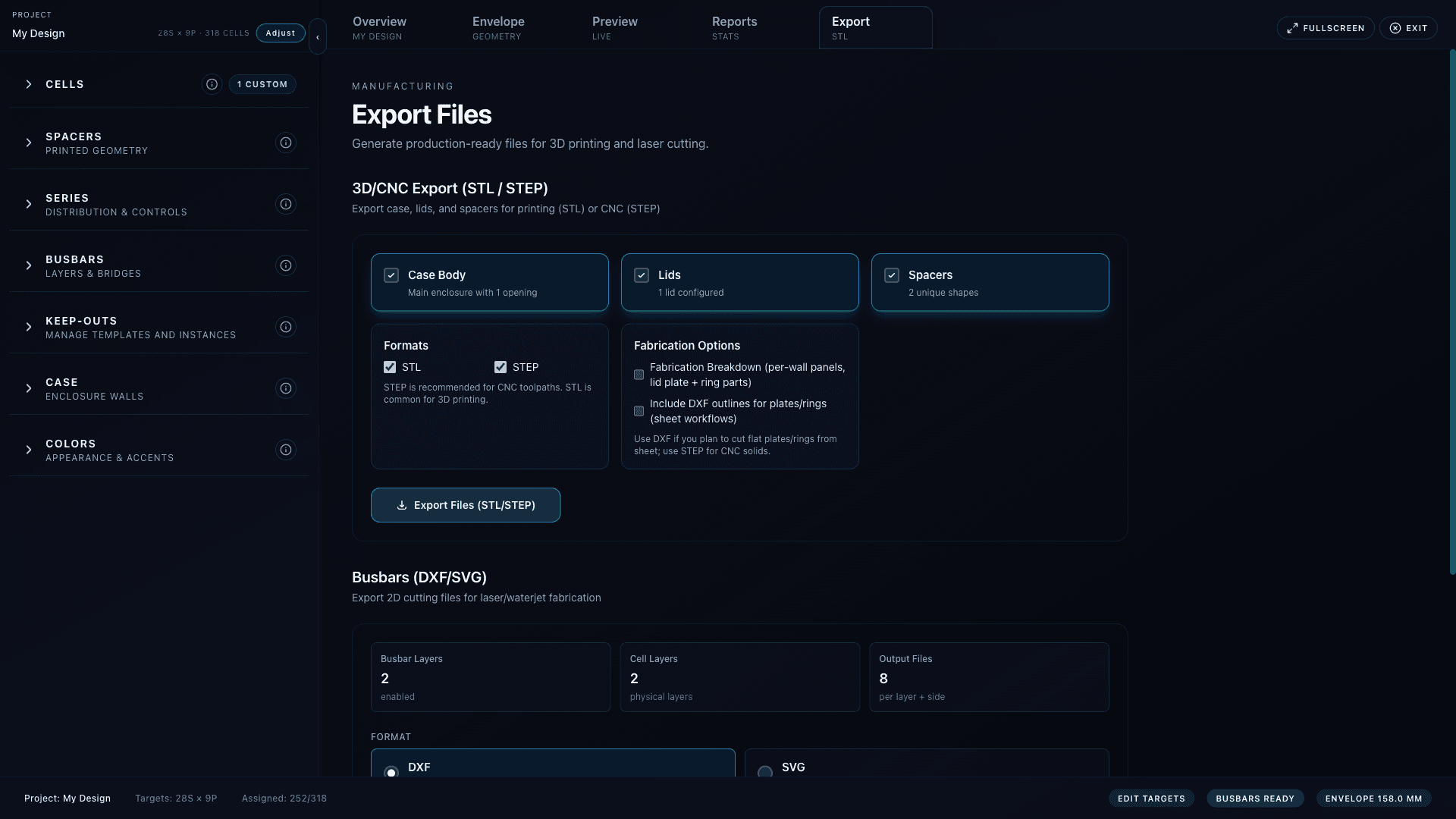
Case and spacer export
- Select what to include: Case, Lids or Panels, and Spacers.
- Choose STL for printing, STEP for CAD/CAM, DXF outlines for sheet workflows, and Spacer DXF when needed.
- Use Print, CNC, or Laser presets to quickly set common format combinations.
- Enable slicing for smaller printers, then set bed width, depth, height, margins, and tile behavior.
- Click export. BatteryBee downloads batterybee-case-export.zip with README.txt and generated files.
What gets generated
Printed case
Exports a case body and optional lid files. Lids require at least one configured lid unless you export only the case body.
Panelized case
Exports generated panels instead of lids. Selected panel faces and advanced per-face overrides are included in the export job.
Bossed case
Exports the one-piece side shell plus top and bottom covers with boss and pilot geometry when enabled.
Spacers
Exports spacer parts as STL, STEP, and optionally DXF. Spacer archives are appended into the main zip.
Breakdown
Adds per-wall panels and lid subparts where supported. This helps review or fabricate components separately.
Sliced files
Splits case or spacer geometry into printer-bed tiles using the active bed and margin settings.
Busbar export
- Choose
DXF,SVG, orSTL. - Only enabled busbar layers are included.
- Exports include current layer-side flips, global bridges, connection transitions, and enabled fold zones.
- DXF/SVG are suited for flat fabrication review; STL is available for busbar solid checks and takes longer.
- The export is a zip when split by layer, side, or disconnected group.
Reports view
- Pack stat sheet: voltage, capacity, energy, cell count, dimensions, and ratings from the current design.
- Assumptions: selected cell fields and any missing values that limit report quality.
- Resistance: cells, busbars, inter-layer links, BMS shunt/path, and layer contribution estimates.
- Sag charts and table: voltage, power, and loss across current presets or a custom current.
- OCV curves: cell and pack voltage curves when OCV points are available.
- Export section: download report data for offline review.
Review before fabrication
BatteryBee exports millimeter geometry in the same Y-up orientation used by the viewer. Open STEP in CAD/CAM and STL in your slicer before cutting, machining, or printing.
Common export blockers
- No scene to export: the project has no generated cell scene yet. Check Geometry and selected cell.
- Select at least one item: Case, Lids/Panels, or Spacers are all disabled.
- Add at least one lid: printed-shell lid export is selected but no lids exist.
- Export timeout: complex geometry operations can exceed local defaults; reduce options or increase export-service timeout in deployment.
- Nothing in busbar export: no enabled busbar layers or no valid busbar geometry from the current wiring.