Drone guide

Plan custom drone battery packs for endurance builds and constrained airframes.

BatteryBee can help when the pack geometry is custom: long-range UAVs, payload power modules, ground-support packs, and odd enclosures that need a repeatable case and spacer workflow.
Fit note: BatteryBee is most useful when the pack geometry, enclosure, service access, or manufacturability need to be designed together instead of chosen off the shelf.

What to solve before the first print

  • Battery bay footprint and stack height
  • Center of gravity and install orientation
  • Wire egress and connector access
  • Case, spacer, and manufacturability constraints
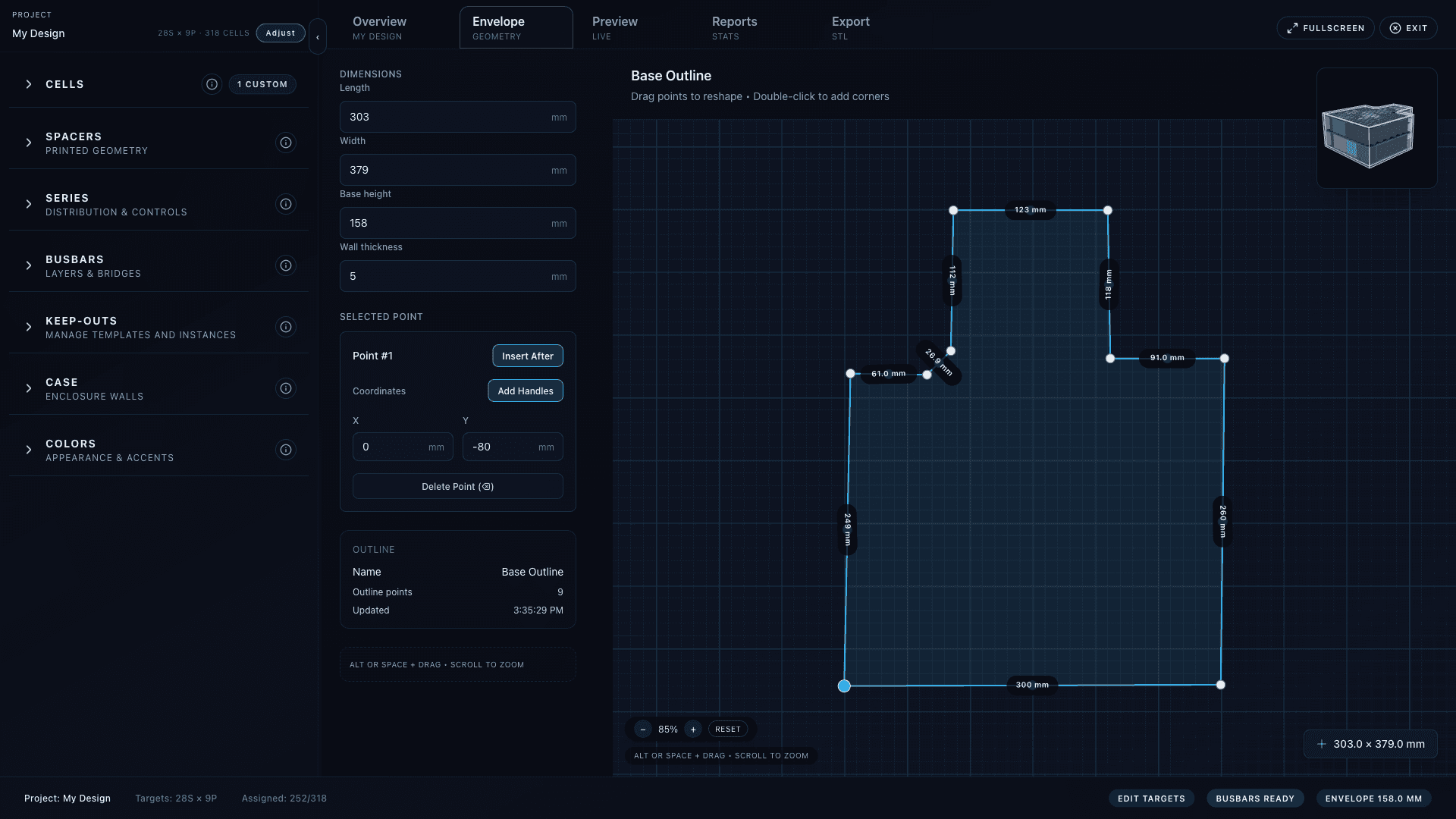
BatteryBee envelope editor for custom pack geometry
Start from the real battery bay geometry, not a guessed rectangle

Where BatteryBee fits in drone workflows

The value is highest when the pack is custom enough that geometry, enclosure decisions, and electrical targets all need to stay connected while you iterate.

Long-range endurance packs

Useful when you are packaging a custom battery into a constrained bay for fixed-wing aircraft, larger endurance quads, or hybrid airframes.

Payload and bay-constrained power modules

Model keep-outs, connector exits, and enclosure walls for payload power, robotics, and other airframe-adjacent battery modules.

Ground support and field packs

The same workflow is handy for charger packs, portable field batteries, and odd one-off enclosures that need repeatable exports.

Recommended workflow

  1. Trace the battery bay or enclosure footprint first. Do not start from nominal pack dimensions if the airframe is the real constraint.
  2. Set the cell format and S/P targets based on endurance, power, and real current demands rather than a guessed geometry.
  3. Reserve keep-outs for flight controller hardware, wiring harnesses, latch mechanisms, and cooling paths before you lock the case.
  4. Use the 3D preview to check stack height, cable egress, and service access before you print spacer sets or enclosure parts.
  5. Export only after the design revision is stable enough to build; treat that revision as the manufacturing snapshot.

Reality checks

  • Center of gravity: will the pack location still let the airframe balance where you need it?
  • Wire routing: can the discharge and balance leads leave the pack cleanly without rubbing on the enclosure or props?
  • Thermal and airflow assumptions: did you leave enough room for the insulation, padding, and cooling strategy you actually plan to use?
  • Serviceability: can the pack be installed, removed, and reworked without destroying the enclosure?
  • Chemistry fit: if you need a commodity high-discharge pouch pack, BatteryBee may not be the right primary tool for that job.

A useful rule of thumb

Good fit

UAV packs, endurance builds, payload modules, and constrained enclosures where you need the case, spacer, and export workflow tied to the geometry.

Probably not the first tool

Straightforward builds where you are mostly selecting an off-the-shelf pack and do not need custom enclosure, spacer, or packaging geometry.

Ready to test the workflow?

Start with the free workspace, validate the geometry in 3D, and export only the revision you would trust yourself to build.